Category: HowTo

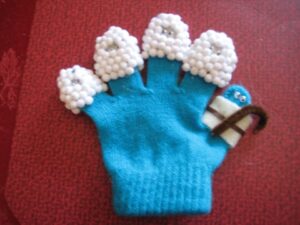
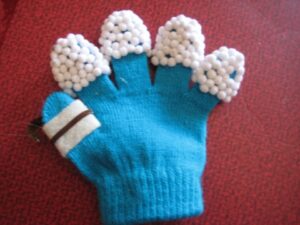
  • 4 Little Sheep

    Despite my love for knitting and crocheting, there are other crafts in my life.  This post has no yarn in it, except for the child’s glove, the cheap kind you get for 99 cents when winter begins. Use the left over one from that pair where one was lost.

    My granddaughter came to visit me and taught me a  song. Her mommy (a creative woman, she takes after her own mom, that’s me) had made sheep/shepherd gloves to use when the little ones in her Toddlers for Jesus class sing Little Sheep.

    I have created a video with instructions on making the gloves followed by my granddaughter singing the song with me.  Because I goofed up singing some of the words I have written them into the video.

    This would be great for upcoming Vacation Bible School events, for Sunday School lessons, and for fun at home.  Check it out.

  • Crochet a Button

    I have been using up my stash by making baby sweaters, blankets, etc.

    For the sweaters I don’t use plastic buttons, I crochet the button. This soft button is easy to make.

    I was recently asked to demonstrate the process so I created this short video to show you how to crochet your own buttons.

    You need to know how to chain and single crochet.

    My sample is done with a 7mm hook to make the stitches easier to see. You can use any size hook and modify the number of stitches accordingly by simply using the basic technique.


  • Salvation Colors: update

    I have received several comments and emails from people just joining in on the Knit-along/Crochet-along. Welcome to all of you

    How are the rest of you coming along? Are your panels completed for the posted colors? 

    Next month I will post the last panel color, Green. Then shortly after that the black and red edgings to complete the project by Easter if you desire.

    If you need to download the previously posted colors, here they are:

    INTRODUCTION 1

    INTRODUCTION 2

    ORANGE

    GOLD

    PURPLE

    WHITE

    BLUE

    If you are not already receiving the monthly newsletter via email, you can sign up at Knitting Bible Study dot com.  You will receive a FREE sample lesson from Knitting Bible Study Book 1. (I am editing a 2nd book now and will include more patterns and also crochet lingo)

    Also, if you are on facebook, be sure to join the Knit and Crochet Bible Study fan club and post pictures of your completed work.

    By the way, a couple of the patterns are very intricate and may require more concentration than other stitch patterns.  My local group got a little frustrated when they looked at my completed project and then at their attempt. Remember, you are seeing my final results, You didn’t see how many times I frogged an entire panel or tinked back a few rows.

    May your hearts be encouraged, being knit together in His love. Col 2:2

  • Salvation Colors Afghan – WHITE

    How is your afghan coming along?  Have you found a pattern you really like and want to incorporate it into other projects?

    I am sitting here watching the snow fall. The world around me is transformed as I watch the flurries fall from the sky’; as I see the white blanket the covers the land; and I watch the window pane frost over from the cold.  It lays a beautiful carpet of white on the ground and glistens.  I don’t mind the snow, as long as I can comfortably stay inside my warm home. 🙂

    The knitting pattern for this panel is called snowflake and seems appropriate for today.  The crochet pattern is called popcorn.  A large bowl of freshly popped corn is a favorite snack, especially when watching a movie.  A time to sit back and relax and enjoy.

    White, in the Salvation Colors, stands for purity, a clean heart.  The purity of Christ offers us the cleansing we receive when washed in His blood.  “He  appeared that He may take away our sins. In Him is no sin. (1 John 3:5 NIV)

    1 John 3:3 reminds us to look for this purity in our lives.  All of us who look forward to his Coming stay ready, with the glistening purity of Jesus’ life as a model for our own. (MSG)

    May you be infused with strength and purity, filled with confidence in the presence of God our Father when our Master Jesus arrives with all his followers. (1 Thes 3:13MSG)

    Download the pattern for knit and crochet here.  (A PDF reader is required)


  • Happy Birthday Jesus

    I am editing the post for this month’s panel in the Salvation Colors afghan.  How are you doing? Are you keeping up? 

    I ran across a post today I want to share with you, it’s along the lines of what we are doing with the afghan.  It’s a Happy Birthday Jesus cake with colors to represent Salvation. 

    You can find the post by clicking here.

    The chocolate layer reminds us that we are sinful.
    The red layer reminds us that Jesus shed his blood for our sins.
    The white frosting reminds us that Jesus has given us a clean heart.
    The green layer reminds us to grow in Christ.
    The yellow decorations remind us of heaven.
    The candles remind us Jesus is the Light of the World.

    Wishing you a very, Merry Christmas and praying you will be blessed with the abundance of God’s love in 2010.

  • Orange: video demo of stitches

    I have hesitated posting the videos on the patterns.  I have edited, re-edited; deleted and started over a number of times.

    My husband finally grabbed both hands in his and told me to stop, get it edited and post. Quit trying to make it perfect.  So I am going to offer what I have and hopefully improve as I go along.

    For the knitted project, the Vertical Weave is a 2 row pattern repeat.  Here I take you through each step. I hope this helps you understand and become more comfortable with the pattern.

    For the crochet project, the pattern is called Alternate Stitch. At first it looks difficult and deceiving, but once you work a few rows you will easily slip right into it.

    How is your project coming along?  Did the video help?  Leave a comment and share your thoughts with others.

  • Knitting Rules! A fun read for all.

    Looking for a fun knitting read?  How about Knitting Rules!: The Yarn Harlot’s Bag of Knitting Tricks.

    With wit, humor and story telling Stephanie Pearl-McPhee explores the fun and long standing rules of knitting. What if you break those rules?!

    Knitting Rules!: The Yarn Harlot’s Bag of Knitting Tricks

    Other books from the author include:

    Stephanie Pearl-McPhee Casts Off: The Yarn Harlot’s Guide to the Land of Knitting

    At Knit’s End: Meditations for Women Who Knit Too Much


  • Can this project be saved?

    While cleaning out my inbox I ran across this article about a sweater knit in wool and acrylic that somehow ended up in the washer and dryer.  It did shrink to the point that the neck is now too small to go over the head of a child.

    Solution? Add a zipper.  Check out the process used at Creative Knitting.

    Click to view article.

    On a personal note, I am still too frightened of unraveling the whole thing to try this myself, but I have seen so many articles on making it work I may have to put this on my Try It Out list.

  • Saving FREE Patterns From the Internet

    The internet offers many creative ideas for knit, crochet, sewing, beading, etc. Here is how I save these patterns to my computer.

    First I created a Digital Pattern File in WORD to access. Here is how I created mine:

    1. Set the margins to .5 all the way around. This is my preference, I then place printed patterns in a plastic sheet protector.
    2. Create a footer. To be sure I add the footer I create one I will overwrite with the words reminding me to add the website where the pattern was found and I also set my preferred pagination Page # of #
    3. Create an insert point for the document. I made a reference which I will overwrite when I paste the new information.
    4. Save the file as a template or another document.

    Now to begin the process and use this template.

    1. Open the online printable version of the pattern.
    2. With your mouse, highlight the entire pattern. This can be done 2 ways:  1. Click CONTROL plus the A key at the same time OR
      2. Place the mouse at the beginning at the pattern and holding down the Left Mouse Button move to the end of the pattern. Release the mouse button, click CONTROL plus the A key at the same time.
      Click CONTROL plus the C key at the same time. This copies the highlighted information to the computers clipboard.
    3. Open the Digital Pattern Template.
    4. Find the insertion point at the beginning of the document and press CTRL and V at the same time. This will paste the information from your clipboard to the document.
    5. Go back to the document and highlight (CTRL+A) and copy (CTRL+C) the webpage.
    6. Return to the document. Select insert” and footer and edit footer.
      Highlight the note to insert the web info and paste (CTRL+V) the webpage address.  If necessary, space to move the page numbering over.
    7. Close the footer.
    8. Look over your pattern. Did any pictures not paste that were on the page? Go back to the webpage, right click on the picture, select copy, return to document, find the position and paste. You may set the location and text wrapping my clicking on the picture and utilizing the picture format feature. I like to use right top align with text. This then allows me to move the picture down a little if desired.
    9. Look over the pattern. Add/remove line spacing or change text size as desired. I do this to cut down the number of pages to the best possible. Example 1: if only 3 lines extend onto page 3, I will try to cut blank lines to make it 2 pages. Example 2: if direction for a row are split on two pages I will adjust so they are one page by adding or deleting blank lines. This allows me to read an entire row without page flipping.
    10. When complete, save the file as you desire. I have the PDF add-in for Word 2007 so I save my completed file as PDF.

    NOTE: PLEASE HONOR COPYRIGHT ON ALL PATTERNS. BE SURE TO INCLUDE THIS INFORMATION ON YOUR PATTERN.