Blog

  • A RedHeart Christmas

    As the end of September approaches I notice many of the local stores are already gearing up with Christmas sections, adding lights, trees and other assorted gadgets to ring in the holidays.

    While my personal opinion is that it is waaay to early to be putting these items on display, it is not to early to have several Christmas knitting and crochet items in progress.

    Celebrating these projects and adding more ideas to my ever growing list is the Twelve Weeks of Christmas offered up by RedHeart.

    Each week a new and ambitious project is published for your holiday craft list.

    Week one: Grannys Noel Throw made with Holiday Yarn.

  • Salvation Colors Afghan – Part 2

    Want to know more about the Salvation Colors Afghan in knit and in crochet?  Find out what each color represents. Get ideas on using it as a witnessing tool.

    Check out the video to learn more about the Salvation Colors project. 

    Collect your supplies. Gather a group of friends to work on this project together. It can be a great time to share your knitting and/or crochet skills; to learn new stitch patterns; and to enjoy each other’s company.

    May your heart be encouraged, being knit (crocheted) together in love. Colossians 2:2

  • Salvation Colors afghan/lapghan – Part 1

    This lesson on various colors representing God’s Plan of Salvation is a fun way to learn Scripture and to tell the Salvation story. When you are finished with the project you will have your own witnessing tool at your fingertips.

    Each color represents God’s love and desire to spend eternity with us. Salvation is a FREE GIFT, but must be accepted.

    Each panel offers a chance to learn a new stitch pattern. I have offered up stitch patterns for a Knit version and for a Crochet version. Both are finished off with crochet edging.

    IF YOU ARE NEW TO KNIT OR CROCHET and are not yet ready to try new stitch patterns, work the project using garter stitch (knit every row) and stockinette stitch (knit one row, purl one row) for the knit version and just single, half, double, or triple crochet for the crochet version.  The important thing here is the colors to make your witnessing tool, not the stitch.  Once you are comfortable with the techniques, make another using the stitch patterns. Mix and match the stitch patterns and colors when you remake the project.

    Make the panels long enough for an afghan or smaller for a lapghan or child size cover up.

    Other project ideas include making shorter strips and planning 3 on each side and still doing the black edging between then using the red to stitch around and make a pillow cover.

    Another idea is to make a scarf by working a pattern to desired size, add 2 rows of black do to the next pattern and continue until all colors are used with black row separators. Edge in red.

    Materials I used and suggest:

    Knitting Needles size 9 for Knit version

    Crochet Hook C or G for both versions

    Cable hook for Knit version for the green panel

    Yarn needle for both version

    1 Skein each color in Red Heart or I Love This Yarn (1 skein of each color made 2 lapghans so would be just right for afghan) WORSTED WEIGHT

    Black

    Orange

    Red

    Gold

    Purple

    Blue

    White

    Green


    Follow along on Facebook, become a fan of Knitting and Crochet Bible Study.

  • Upcoming STASH BASH giveaway

    I am finalizing the September newsletter. This month will include a giveaway from my extensive stash. 

    This month the giveaway includes miscellaneous patterns leaflets, a size H crochet hook and 2 hardbound pattern books:

    You must be registered for the newsletter. Not signed up?  Go to http://www.KnittingBibleStudy.com and sign up.  You will also receive notification of how to download a sample lesson from Knitting Bible Study, Book 1 within approximately 24 hours.


  • Upcoming KAL and CAL

    As I was writing up the patterns for the Salvation Colors lapghans an idea started to knit in my head.

    Let’s make these together!! How about a Knit-A-Long (KAL) and a Crochet-A-Long (CAL) featuring one panel a month. If we start in September/October we will finish up in April in time for Easter. In the end you have your own witnessing tool.

    With this in mind I am preparing the story for each color and pattern will be posted one each month. I will also prepare a short video for each stitch pattern to help you along the way. Comments will be open on the blog to allow for questions and comments on the pattern.

    So mark your calendar, panel 1 will be posted next week.

    For this is what the Lord has commanded us: “I have made you a light for the Gentiles, that you may bring salvations to the ends of the earth. Acts 13:47NIV

  • Knitting Rules! A fun read for all.

    Looking for a fun knitting read?  How about Knitting Rules!: The Yarn Harlot’s Bag of Knitting Tricks.

    With wit, humor and story telling Stephanie Pearl-McPhee explores the fun and long standing rules of knitting. What if you break those rules?!

    Knitting Rules!: The Yarn Harlot’s Bag of Knitting Tricks

    Other books from the author include:

    Stephanie Pearl-McPhee Casts Off: The Yarn Harlot’s Guide to the Land of Knitting

    At Knit’s End: Meditations for Women Who Knit Too Much


  • Still working

    My local Knit Crochet Bible Study starts tomorrow night so I am frantically typing away, getting the pattern written out for the Colors of Salvation afghan/lapghan.

    I finished up a knit and a crochet version.  I will be posting the patterns and scripture verses soon.


  • Salvation Colors Lapghan

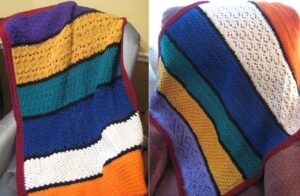
    Just finished writing up the lessons for the Fall Knitting/Crochet Bible Study at my church. I have created lapghans to practice new stitches while studying this semester. Using the “Colors of Salvation” we will knit and or crochet lapghans, or perhaps use the strips for scarves. No matter what their final project is, here are pics of the lapghans.  I am now writing up the patterns and will post for download soon.


  • Can this project be saved?

    While cleaning out my inbox I ran across this article about a sweater knit in wool and acrylic that somehow ended up in the washer and dryer.  It did shrink to the point that the neck is now too small to go over the head of a child.

    Solution? Add a zipper.  Check out the process used at Creative Knitting.

    Click to view article.

    On a personal note, I am still too frightened of unraveling the whole thing to try this myself, but I have seen so many articles on making it work I may have to put this on my Try It Out list.

  • Saving FREE Patterns From the Internet

    The internet offers many creative ideas for knit, crochet, sewing, beading, etc. Here is how I save these patterns to my computer.

    First I created a Digital Pattern File in WORD to access. Here is how I created mine:

    1. Set the margins to .5 all the way around. This is my preference, I then place printed patterns in a plastic sheet protector.
    2. Create a footer. To be sure I add the footer I create one I will overwrite with the words reminding me to add the website where the pattern was found and I also set my preferred pagination Page # of #
    3. Create an insert point for the document. I made a reference which I will overwrite when I paste the new information.
    4. Save the file as a template or another document.

    Now to begin the process and use this template.

    1. Open the online printable version of the pattern.
    2. With your mouse, highlight the entire pattern. This can be done 2 ways:  1. Click CONTROL plus the A key at the same time OR
      2. Place the mouse at the beginning at the pattern and holding down the Left Mouse Button move to the end of the pattern. Release the mouse button, click CONTROL plus the A key at the same time.
      Click CONTROL plus the C key at the same time. This copies the highlighted information to the computers clipboard.
    3. Open the Digital Pattern Template.
    4. Find the insertion point at the beginning of the document and press CTRL and V at the same time. This will paste the information from your clipboard to the document.
    5. Go back to the document and highlight (CTRL+A) and copy (CTRL+C) the webpage.
    6. Return to the document. Select insert” and footer and edit footer.
      Highlight the note to insert the web info and paste (CTRL+V) the webpage address.  If necessary, space to move the page numbering over.
    7. Close the footer.
    8. Look over your pattern. Did any pictures not paste that were on the page? Go back to the webpage, right click on the picture, select copy, return to document, find the position and paste. You may set the location and text wrapping my clicking on the picture and utilizing the picture format feature. I like to use right top align with text. This then allows me to move the picture down a little if desired.
    9. Look over the pattern. Add/remove line spacing or change text size as desired. I do this to cut down the number of pages to the best possible. Example 1: if only 3 lines extend onto page 3, I will try to cut blank lines to make it 2 pages. Example 2: if direction for a row are split on two pages I will adjust so they are one page by adding or deleting blank lines. This allows me to read an entire row without page flipping.
    10. When complete, save the file as you desire. I have the PDF add-in for Word 2007 so I save my completed file as PDF.

    NOTE: PLEASE HONOR COPYRIGHT ON ALL PATTERNS. BE SURE TO INCLUDE THIS INFORMATION ON YOUR PATTERN.